Accessibility

A more usable PedalVale experience for more people

PedalVale aims to make shopping for cycling and urban mobility products easier to navigate, understand and use across different devices, input methods and accessibility needs. Accessibility is treated as an ongoing part of the website experience rather than a one-time project.
Clear interaction Navigation and controls should be understandable.
Flexible use The experience should support different ways of browsing.
Ongoing improvement Accessibility feedback helps guide future updates.
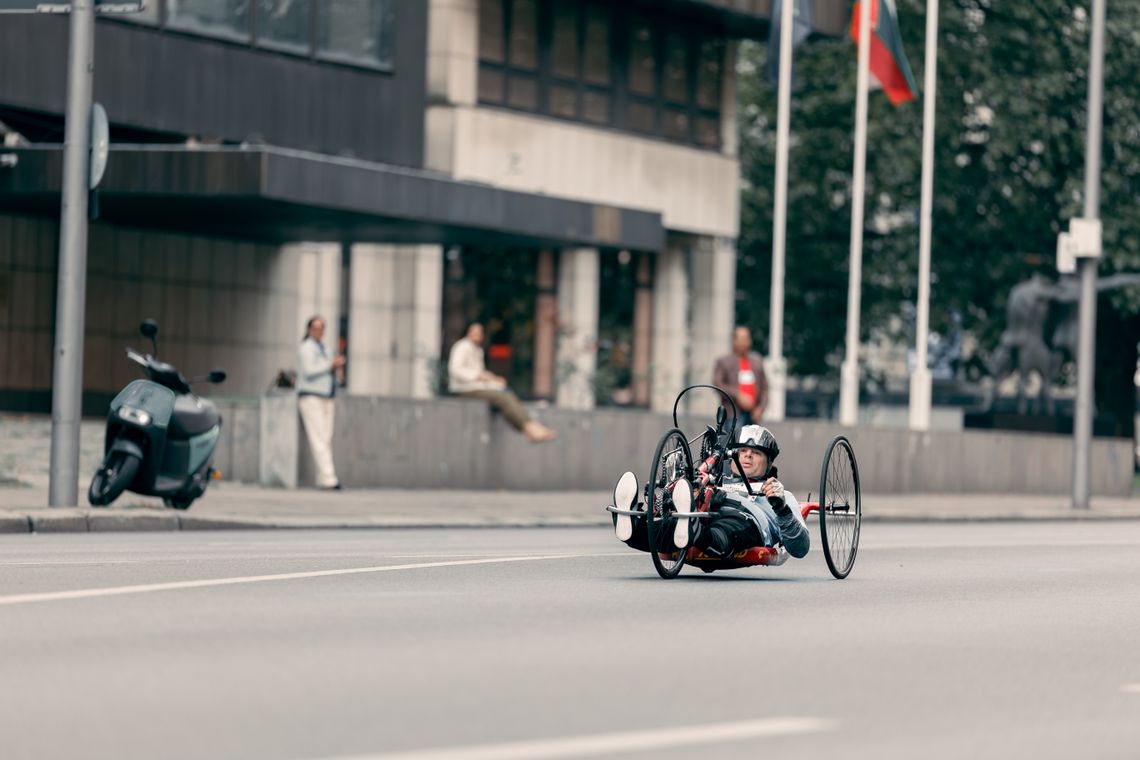
Adaptive cyclist riding a handcycle on a city street
Inclusive mobility belongs in the city
Accessibility Principles

Useful design begins with clarity, flexibility and respect

PedalVale works toward a website experience that reduces unnecessary barriers while preserving the calm, editorial character of the brand.

01 / UNDERSTANDABLE

Content should explain what happens next

Navigation labels, product information, buttons, forms and policy content should use language that helps customers understand actions before they take them.

02 / OPERABLE

Important controls should not depend on one input method

Core shopping and navigation interactions should be designed with keyboard use, touch input and conventional pointer input in mind.

03 / PERCEIVABLE

Information should not rely on visual styling alone

Readable text, meaningful labels, alternative text and visible focus treatment can help communicate information beyond color or decorative presentation.

Woman using a wheelchair while working on a laptop in a bright cafe
Digital access should support different users
Digital Access

The website should remain understandable across devices

PedalVale aims to support customers who browse on desktop computers, laptops, tablets and phones, including people who use assistive technology or alternative interaction methods.

Semantic structure Headings, navigation, buttons and form controls should be organized in ways that make page structure easier to understand.
Responsive layout Content should adapt to different screen sizes without requiring unnecessary horizontal scrolling.
Meaningful labels Interactive controls should use understandable names rather than relying only on icons, placement or visual convention.
Alternative text Product and editorial images should use useful text descriptions when the visual content communicates meaningful information.
Zoom and resizing Page layouts should remain usable when customers enlarge text or zoom the browser within reasonable ranges supported by their device.
Keyboard & Focus

Important actions should remain reachable without a mouse

Keyboard access is an important part of a usable website. PedalVale aims to keep navigation, links, buttons and form controls reachable in a logical sequence where the surrounding technology allows it.

Focus

Active controls should be visible

A visible focus indicator helps show which link, button or field is currently selected during keyboard navigation.

Sequence

Navigation order should feel logical

Keyboard movement should generally follow the reading and interaction order presented on the page.

Activation

Buttons and links should behave predictably

Interactive elements should use appropriate control types so standard keyboard behavior can work as expected.

Escape paths

Overlays should not trap navigation

Where menus or dialogs are used, the experience should provide a reasonable way to continue or leave the interaction.


Two women using a smartphone together, including a woman with a prosthetic hand
Technology should work with different ways of interacting
Woman using a wheelchair completing a smartphone payment at a cafe counter
Accessible interaction supports everyday independence
Visual Readability

Readable content matters more than decorative complexity

PedalVale uses a restrained visual system with strong hierarchy, clear spacing and deliberate contrast. Accessibility remains part of that visual approach.

  • Body text should maintain practical contrast against its background and avoid decorative treatments that reduce legibility.
  • Dark sections should use light text so important information remains readable.
  • Meaning should not depend only on color, particularly for status, validation, warnings or required fields.
  • Heading sizes should remain controlled so text does not overflow or become difficult to scan on smaller screens.
  • Images should not cover text, and meaningful visual content should be supported by appropriate alternative text where possible.
Inclusive Mobility

Cycling and mobility take more than one form

PedalVale serves a broad urban mobility context. Riders and customers may use different bicycles, adaptive cycles, mobility equipment and personal setups, and product information should avoid assuming that every customer rides or interacts in exactly the same way.


  • Product descriptions should focus on actual dimensions, mounting requirements, fit and function rather than unnecessary assumptions about the user.
  • Compatibility information should be stated clearly when products depend on a specific frame, handlebar, wheel, rack, valve or device configuration.
  • Customers should be able to ask compatibility questions when a product page does not fully address their setup.
  • Accessibility language should remain respectful, practical and centered on usability rather than treating disability as a marketing device.
Wheelchair user seated beside an adaptive handcycle with a bright pannier
Adaptive cycling expands what mobility can look like
Inclusive customer service interaction with a wheelchair user and smartphone
Support interactions should remain clear and inclusive
Forms, Checkout & Support

Important information should stay clear during action

Forms and transactional steps carry more pressure than ordinary browsing. PedalVale aims to keep labels, instructions, validation and support paths understandable throughout the shopping journey.

Labels

Fields should explain what information is needed

Inputs should have meaningful labels rather than depending only on placeholder text.

Errors

Validation should identify the problem clearly

Error messages should help customers understand what needs attention rather than relying on color alone.

Checkout

Critical details should remain easy to review

Order, address and payment-related information should be presented in a way that supports careful review before submission.

Assistance

Support should remain available when digital steps are difficult

Customers can request help when a website interaction creates a barrier or an order needs additional assistance.

Motion & Interaction Comfort

Animation should support the interface rather than dominate it

PedalVale uses restrained motion and transition effects as part of its editorial visual system. These effects should remain secondary to content and interaction.

Respect reduced-motion preferences

Where supported, decorative animation should be minimized or removed when the device indicates a reduced-motion preference.

Avoid unnecessary flashing

The design should avoid rapid or decorative flashing effects that add risk without improving the shopping experience.

Keep content stable

Text, buttons and essential information should not move in ways that make reading or activation unnecessarily difficult.

Use motion as feedback

Subtle transitions may help indicate hover, focus or state changes when they do not replace clear labels and structure.

Wheelchair user beside an adaptive cycle on an urban pathway
Accessible movement should feel natural and usable
Third-Party Services

Some parts of the experience depend on outside platforms

Payment, shipping, embedded tools and other services may be provided by third parties with their own accessibility practices and technical limitations.

Payments
Checkout services Payment interfaces may include technology supplied by payment providers outside PedalVale's direct control.
Shipping
Tracking systems Carrier tracking pages and external shipment tools can have their own interface and accessibility behavior.
Media
Embedded content External video, social or other embedded services may not always match the accessibility behavior of the main PedalVale website.
Limitations
Ongoing review When a third-party tool creates a meaningful barrier, feedback can help PedalVale understand where another path or improvement may be needed.
Man carrying an adaptive handcycle on a neighborhood street
Access improves when design adapts to real people
PedalVale Accessibility Commitment

Accessibility is a continuing design responsibility

PedalVale does not treat accessibility as a finished status. The website, content and supporting services can change over time, and accessibility work should continue alongside those changes.

  • Review accessibility when new page structures, components or interactions are introduced
  • Use customer feedback to identify barriers that automated checks may not reveal
  • Keep product information, service policies and support content understandable and well structured
  • Provide 24/7 customer support when a customer needs help using the website or completing an order

Found an accessibility barrier on PedalVale?

If a page, control, product detail, checkout step or other website feature is difficult to use because of an accessibility barrier, please tell us what happened, which page was involved and what device or assistive technology you were using if you are comfortable sharing that information.

Send Accessibility Feedback
Business PedalVale
Address 1300 Crossing Place, Apt 2912 Austin, TX 78741 United States
Email support@pedalvale.lol
Phone +1 (440) 884-5829